
The 3-2-1 Backup Rule and Ransomware Recovery
What 3 copies, 2 storage systems and 1 off-site copy mean, why ransomware needs an immutable or offline copy too, and how to prove a restore works with checksums.
By Redbison Dev · · Updated · 10 min read
Your only backup is a nightly dump on the database server's own disk, and you have just read about a company whose backups were encrypted along with everything else. The 3-2-1 backup rule is the fix: keep 3 copies of your data, on 2 separate kinds of storage, with 1 copy off-site. Against ransomware, add one more condition: at least one copy must be offline or immutable, so that credentials stolen from your servers cannot delete or encrypt it, and you must prove it restores.
This post explains the rule, what ransomware changes about it, how immutable and offline copies work, and how to test a restore with checksums, using one PostgreSQL database as the worked example. It draws on the CISA #StopRansomware Guide, NIST SP 800-209 (Security Guidelines for Storage Infrastructure) and the UK NCSC's principles for ransomware-resistant cloud backups.
What the 3-2-1 rule means
The rule is an old rule of thumb, not a standard, and each number guards against a different failure.
- 3 copies: the live data plus two backups. One backup can be corrupt, mid-write or missing a night; two independent ones rarely fail together.
- 2 kinds of storage: the original wording says two media types (disk and tape, say). Today read it as two separate storage systems that do not share a failure: a backup on another folder of the same disk, or the same storage array, dies with the original.
- 1 off-site: a copy in another building, region or cloud account survives fire, flood, theft and a compromised site. NIST SP 800-209 asks for the same for cyber-attack recovery copies, which "should be stored off-site rather than where the production data is stored."
Some vendors extend it to 3-2-1-1-0: one copy offline or immutable, and zero errors when the backups are verified. The extra digits are exactly the ransomware lessons below.
What ransomware changes
A fire does not go looking for your backups. Ransomware operators do. CISA's #StopRansomware Guide advises keeping offline, encrypted backups of critical data and testing them regularly, because ransomware actors look for reachable backups and delete or encrypt them so that paying becomes the only way back.
That changes the question from "where are the copies?" to "what can the attacker reach?". If the backup server mounts the NAS, and the cloud bucket accepts deletes from the same access key the server uses, then all three copies sit inside one blast radius, and 3-2-1 on paper becomes 1 copy in practice. NIST SP 800-209 spells out the separation:
- recovery copies are managed from separate systems, and "it should not be possible to access such management systems with regular credentials (including production and regular backup)" (IS-SS-R2);
- recovery copies "should not be mounted, exported, or mapped to a host or application" and are restored onto an isolated staging environment rather than straight onto the target hosts (IS-SS-R7);
- organizations should consider an air gap (IS-SS-R8) and immutable storage such as "retention locking, vault locking, immutability policies" (IS-SS-R10).
Replication is not a backup for this purpose. A synchronous replica copies an encrypted block or a dropped table to the other site within moments. You need point-in-time copies that the attacker cannot rewrite.
Immutable and offline copies
There are two ways to put a copy out of reach.
Offline (air-gapped). A drive or tape that is unplugged and stored elsewhere cannot be reached over the network at all. It is cheap and strong, but someone has to rotate the media, and the copy is only as fresh as the last rotation.
Immutable (locked). Object storage can refuse to delete or overwrite a version until a date you set. On Amazon S3, Object Lock needs versioning turned on and has two modes. In governance mode, users with a special permission can still remove the lock. In compliance mode, a locked object version "can't be overwritten or deleted by any user, including the root user" until its retention period ends. Choose compliance mode for ransomware copies; governance mode is useful for trying out retention settings first. Other providers have equivalents under names such as immutable storage or retention lock.
The NCSC's principles for cloud backups add the controls around the lock: block destructive requests even from administrators, with any exception "authorised out-of-band"; keep a version history so you can restore a version from before the infection; and raise alerts on mass deletions, stopped backups or changed retention, "whether the attempts are successful or not." Put the locked copy in a separate account with its own credentials, so that the keys on your servers can write new backups but never shorten a retention period.
Set the retention window longer than you expect to need. Attackers can be inside a network for some time before they encrypt, and every backup taken after they arrived may contain their tools. Keeping older copies lets you restore from before the compromise.
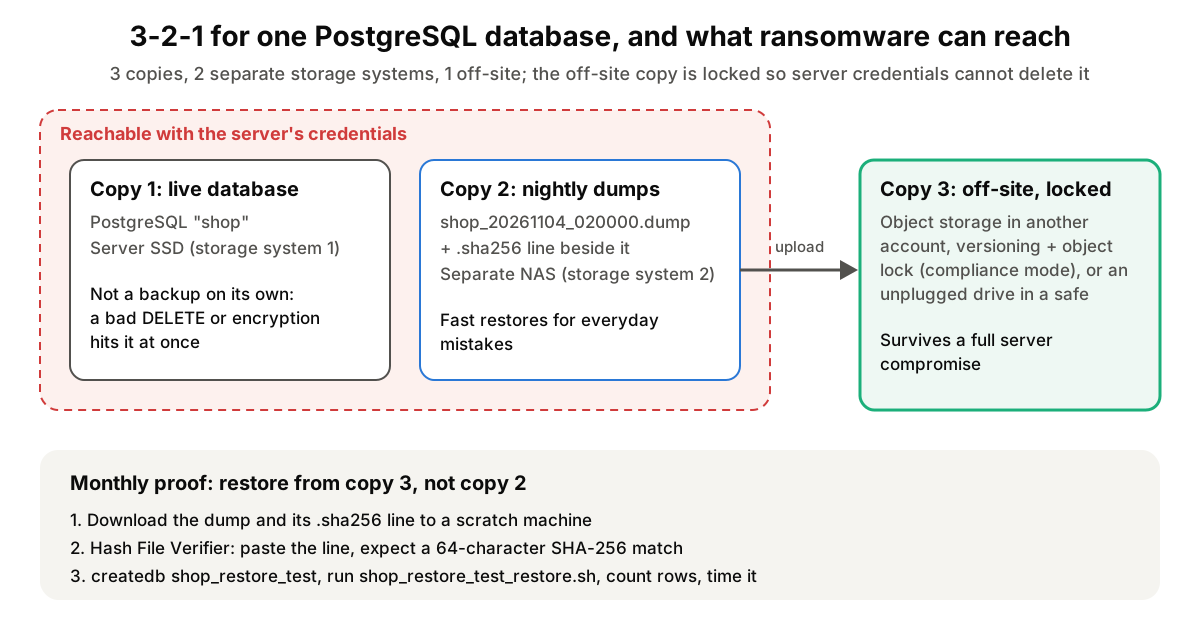
Worked example: 3-2-1 for a PostgreSQL database
Say you run a small online shop on one PostgreSQL server with a database called shop.
Step 1: generate a backup script that fails loudly. Open the Database Backup Script Generator. Set Database Type to PostgreSQL (the port changes to 5432), leave Host as localhost, type backup_user as Username and shop as Database Name, keep Include table structure and Include data ticked, tick Compressed custom format (pg_restore), and click Generate Scripts. The Backup Script tab now runs pg_dump with --format=custom and --no-owner, writes files named like /backup/postgresql/shop_20261104_020000.dump, exits with pg_dump's error code if the dump fails (so cron reports it), and sets the file to chmod 600. Download it as shop_backup.sh.
Step 2: write a checksum next to every dump. After the script's ls -lh "$FILE" line, add:
( cd "$BACKUP_DIR" && sha256sum "$(basename "$FILE")" > "$(basename "$FILE").sha256" )
That writes a one-line file in the standard sha256sum format, 64 hex characters, two spaces, then the file name. Store a second copy of these lines somewhere the backup server cannot overwrite, such as a locked object version in the off-site account (check the version you wrote, not just the latest) or a ticket, because an attacker who can replace a dump can replace a checksum stored beside it.
Step 3: make copies 2 and 3. Copy 2 is the dump on a NAS or a second machine (not a folder on the database server's disk). Copy 3 goes to object storage with Object Lock in compliance mode in a separate account, uploaded with a key that can write but not delete, or to a drive that is unplugged after each copy.
Step 4: get a restore script for the test database. Back in the generator, change Database Name to shop_restore_test and click Generate Scripts again. Open the Restore Script tab: it restores with pg_restore ... --clean --if-exists --no-owner --exit-on-error "$FILE" into shop_restore_test, never into the live shop. Download it; the file is shop_restore_test_restore.sh.
Step 5: check the checksum works before you need it. Open the Hash File Verifier, select the downloaded shop_restore_test_restore.sh, and paste this into Expected Hash:
bd7a73cef0e419879f515863982343470c623e4e8c6e9586b7b4e2b3420488c1 shop_restore_test_restore.sh
Leave Algorithm on auto-detect and click Verify File. The tool reads the sha256sum line, picks SHA-256 from the 64-character length, and shows Hash Verification Passed. Now open the script in an editor, change DB_PORT='5432' to DB_PORT='5433', save it and verify again: one changed character gives dca92916d2e519ed8bf68737553ab648255c686c63e394bdfb861b0ac2ddab8f and Hash Verification Failed. (A file copied from the screen rather than downloaded may differ in its final line break and hash differently; use the download button.) Your real dump files work the same way: drop the .dump in, paste its line from the .sha256 file.
How to test a restore
A checksum proves the bytes are the ones you wrote. It does not prove the dump was complete or that it restores. Only a restore proves that, which is why NIST SP 800-209 asks you to "perform a periodic test restore to ensure that it is completed successfully and that it meets the required timeframe" (RA-SS-R5). The basic drill (restore last night's dump into an empty shop_restore_test, compare row counts, time it) is in the "Prove it restores" section of Database Backups with pg_dump, mysqldump and Friends. For ransomware recovery, change three things:
- Restore from copy 3, the locked off-site copy, not the convenient one on the NAS, since copy 3 is the one you will need after an attack. Download it to a scratch machine that is not on the production network; NIST asks for recovery copies to be restored onto an isolated staging environment (IS-SS-R7).
- Verify the checksum before restoring, in the Hash File Verifier or with
sha256sum -c shop_20261104_020000.dump.sha256, against the line you stored outside the backup server. A mismatch means the copy was corrupted or replaced, and the drill has already found a problem. - Record the time and the age of the copy. The restore time is your real recovery time objective (RTO), which NIST describes as "the expected recovery speed." The age of the newest good copy is your recovery point: how much data you would lose.
NIST also gives a pace for health checks: validate copies at least once a year, and preferably at about one-tenth to one-thirtieth of the backup frequency, "hourly copies validated daily, daily copies by-weekly to monthly" (RA-SS-R8). And it reminds you that a database dump is not the whole system: back up certificates, encryption keys, configuration files and the recovery plan itself (RA-SS-R1 and RA-SS-R10), and keep the restore script with the off-site copy.
This post is general guidance for small teams. If you are in the middle of an attack, do not restore onto machines that may still be infected: isolate them, report the incident (in the US, to CISA or the FBI), and bring in an incident response firm or your insurer's panel before you touch the backups.
Tools for this job
- Database Backup Script Generator: produces the backup and restore scripts for PostgreSQL, MySQL, SQLite, SQL Server and Oracle with exit-code checks, so a failed nightly dump does not go unnoticed; generate a second restore script for your scratch database.
- Hash File Verifier: checks a dump or archive against its
sha256sumline, BSD-style line or bare hash in the browser, so you can confirm the copy you downloaded from off-site storage is the one you wrote.
For the dump flags, globals and the mistakes that break restores, read Database Backups with pg_dump, mysqldump and Friends: What Actually Works. For what a checksum does and does not prove compared with a signature, see Checksums vs Digital Signatures: How to Verify What You Download, and for choosing between SHA-256 and other hashes, Comparing Hash Algorithms: Security Margins, Speed and the Keccak Trap.
Frequently asked questions
Is cloud sync, such as a shared drive, a backup?
Not on its own. Sync copies changes, so encrypted or deleted files are synced to every device within minutes. It becomes a backup only if the service keeps a version history that ransomware cannot purge, and even then you need a copy held under separate credentials.
Do I still need 3-2-1 if my cloud provider keeps snapshots?
Yes, if the snapshots live in the same account as the data. Someone with your administrator credentials can usually delete both. Copy snapshots or dumps to a separate account with immutable retention, which keeps the off-site copy outside that blast radius.
How long should immutable backups be retained?
Long enough to cover the time an intruder might sit unnoticed before encrypting, plus your own detection time. Set retention per data set from your recovery needs and any legal retention rules, and keep some older weekly or monthly copies beyond the daily ones.
Should backups be encrypted?
Yes. CISA's guidance says offline, encrypted backups, and an off-site copy you do not control physically should be encrypted before it leaves your network. Store the decryption keys separately and back them up too, or the backup cannot be restored.
Sources and further reading
- #StopRansomware Guide, CISA. Joint guidance on preventing and responding to ransomware, including offline, encrypted backups and regular restore testing.
- Security Guidelines for Storage Infrastructure, SP 800-209, NIST. Isolation (IS-SS-R1 to R10) and restoration assurance (RA-SS-R1 to R12) recommendations for backup and recovery copies, October 2020.
- Principles for ransomware-resistant cloud backups, UK National Cyber Security Centre. Five principles for backups that resist deletion, keep versions and alert on tampering.
- Locking objects with Object Lock, Amazon Web Services. Governance and compliance retention modes, legal holds and how deletes behave on locked versions.
- pg_dump, PostgreSQL documentation. The custom archive format and options used by the generated backup script.
- sha256sum invocation, GNU coreutils manual. The checksum line format and the
-coption for checking files against it.