
Big-Endian vs Little-Endian: Byte Order with Real Examples
The same four bytes read both ways, where each byte order is used (x86 and ARM memory, network headers, PNG and ZIP) and how DataView's littleEndian flag controls it.
By Redbison Dev · · Updated · 9 min read
You are parsing a binary file by hand: the specification says the image width is a 4-byte integer at offset 16, the bytes there are 00 00 03 E8, and your code prints 3,892,510,720 instead of 1,000. The bytes are right; the order you read them in is wrong. Endianness is the order in which the bytes of a multi-byte number are stored. Big-endian puts the most significant byte first, at the lowest address; little-endian puts the least significant byte first. Network protocols and PNG use big-endian, x86 and Arm memory and ZIP use little-endian, and every reader has to know which one it is dealing with.
The same four bytes, read both ways
Take the 32-bit value 0x12345678, which is 305,419,896. Its four bytes are 12, 34, 56 and 78. A big-endian machine writes them to memory in that order. A little-endian machine writes them backwards, starting with the low byte 78:
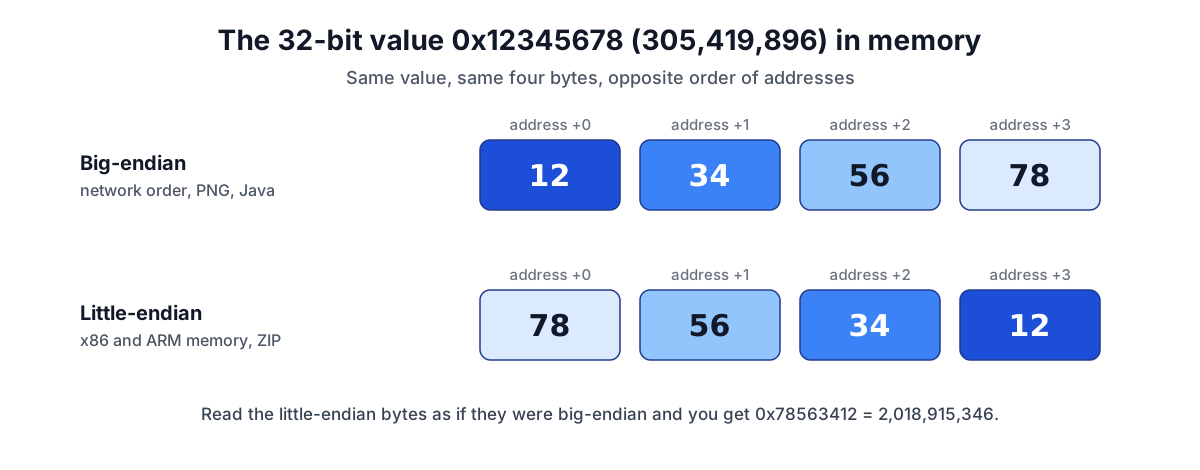
Nothing about the bytes says which order was used. 78 56 34 12 read as big-endian is 0x78563412, which is 2,018,915,346, a perfectly valid but wrong number. You can check both readings with the Number Base Converter: type 0x12345678, set the width to 32-bit, and the two's complement card lists "Bytes, big-endian" as 12 34 56 78 and "Bytes, little-endian" as 78 56 34 12. Type 0x78563412 and you get the decimal value of the misread.
The names come from Danny Cohen's 1980 note "On Holy Wars and a Plea for Peace" (IEN 137), which borrowed them from the egg-cracking factions in Gulliver's Travels. His point was that neither order is better; what matters is that both ends of a link agree.
Where each byte order is used
Processor memory. Intel's x86 and x86-64 processors are little-endian. The Arm architecture can run in either order, but toolchains default to little-endian (GCC's aarch64 target, for example) and that is how phones, Arm laptops and Arm servers normally run. Big-endian processors survive in older and specialised systems such as IBM mainframes and some network hardware. In practice, the computer you are reading this on is almost certainly little-endian.
Network protocols. Internet protocols send multi-byte fields most significant byte first. RFC 791, the IPv4 specification, says so in its appendix on data transmission order, and the convention is known as network byte order. The address 192.168.1.1 goes on the wire as C0 A8 01 01. Held as a 32-bit integer in x86 memory, the same address is 01 01 A8 C0. Print those memory bytes as an address and you get 1.1.168.192, the classic symptom of a missing htonl. The IPv4 Address Converter shows the integer (3,232,235,777) and hex form (0xC0A80101) of an address, in network order.
File formats. Each format picks one order and states it. PNG section 7.1 says all integers wider than one byte are in network byte order, so an image 1,000 pixels wide has 00 00 03 E8 in its IHDR chunk. ZIP's APPNOTE says values are stored little-endian unless stated otherwise. That is why its local file header signature, defined as 0x04034b50, appears on disk as 50 4B 03 04, the familiar "PK" at the start of every ZIP, DOCX and JAR file. Read big-endian, those bytes would be 0x504B0304, which is 1,347,093,252. UTF-16 text marks its order with a byte order mark: FE FF for big-endian and FF FE for little-endian, covered in the text encoding guide.
Floats have a byte order too
IEEE 754 defines the bits of a float, not the order its bytes are stored in. That is left to the machine or the file format, and the effect of a mix-up is more dramatic than with integers, because the swapped bytes land in the exponent field.
Here is a worked example with the IEEE 754 Float Converter. Select single precision and type 3.14159274 (π rounded to a float). The tool shows the pattern 0x40490FDB, with "Bytes, big-endian" 40 49 0F DB and "Bytes, little-endian" DB 0F 49 40. A little-endian program writing that float to a file stores DB 0F 49 40. Now switch to "Bits to number" and type those bytes as they appear in the file, DB0F4940. The tool decodes them as -40,331,460,896,358,400: sign bit set, exponent 182 - 127 = 55. The float 1.0 does the opposite. Its little-endian bytes 00 00 80 3F, read big-endian, become a subnormal near 4.6006 × 10^-41.
So a float that comes out absurdly large, tiny or negative is a strong hint that the byte order is wrong. Decoding both orders in the converter shows at a glance which one gives a sensible value.
Byte order in JavaScript: DataView and typed arrays
JavaScript gives you both behaviours, and mixing them up is a common bug in code that reads binary files or WebSocket messages.
const bytes = new Uint8Array([0x78, 0x56, 0x34, 0x12]);
const view = new DataView(bytes.buffer);

view.getUint32(0);        // 2018915346 (0x78563412): big-endian, the default
view.getUint32(0, true);  // 305419896  (0x12345678): littleEndian = true

new Uint32Array(bytes.buffer)[0]; // 305419896 on a little-endian machine
Every DataView getter and setter for more than one byte takes an optional littleEndian flag, and MDN notes that it defaults to big-endian even though most platforms are little-endian. Typed arrays such as Uint32Array and Float32Array use the platform's own byte order, so they read little-endian data correctly on nearly every device, and big-endian data incorrectly. Use typed arrays for data your own program wrote in memory, and DataView with an explicit flag for anything that comes from a file or the network. The same rule applies to floats: getFloat32(0, true) on 00 00 80 3F returns 1.
Other languages have the same switch in different places: format prefixes in Python's struct (< for little, > or ! for big), ByteBuffer.order() in Java (big-endian by default), and htonl and ntohl in C for converting between host and network order.
How to work out which order a file uses
- Read the specification. Most formats state their byte order in one sentence near the start, as PNG and ZIP do.
- Look for a marker. UTF-16 byte order marks and some file headers declare the order in their first bytes.
- Decode a field you know. Pick a value you can predict, such as the image width or a record count, and read it both ways. 1,000 is plausible; 3,892,510,720 is not. The Hex Editor shows the bytes and their offsets so you can find the field.
- Watch for patterns. Small little-endian integers end in zero bytes (
E8 03 00 00); small big-endian ones start with them (00 00 03 E8).
To swap the order, reverse the bytes within each field, never across the whole file: a 4-byte field and a 2-byte field next to each other are reversed separately.
Tools for this job
- Number Base Converter: the bytes of any integer in both orders at 8 to 64 bits, and the decimal value of a misread pattern.
- IEEE 754 Float Converter: the big-endian and little-endian bytes of a float or double, and the value of four or eight bytes read either way.
- Hex Editor: find the field in a real file and see its bytes with their offsets.
- IPv4 Address Converter: an IPv4 address as the 32-bit integer it is on the wire, in network byte order.
Related reading: binary, hex and IEEE 754 floats, bit by bit explains the bit patterns being reordered here, how to read a hex dump covers offsets and magic numbers, and the subnetting guide works with addresses in their binary form.
Frequently asked questions
Does endianness affect the order of bits inside a byte?
Not for anything a program can see. Memory is addressed in bytes, and a byte's value is the same on every machine: 0x80 is 128 everywhere. Bit order only matters at the level of serial links and some packed bit-field layouts, where the protocol or compiler defines it.
Do single bytes and text in UTF-8 have an endianness?
No. Byte order only applies to values wider than one byte. UTF-8 is defined as a sequence of single bytes, so it reads the same everywhere, and a UTF-8 byte order mark only says that the text is UTF-8. UTF-16 and UTF-32 use 2- and 4-byte units and do have a byte order.
Is "network byte order" always big-endian?
For the Internet protocol suite, yes: IP, TCP, UDP and DNS headers are big-endian, and the term means big-endian. Application formats carried inside those packets choose their own order, and several modern ones, such as Protocol Buffers' fixed-width fields, are little-endian.
Why is little-endian so common on desktops and phones?
Because the processors in them run that way: Intel's manual describes x86 as little-endian, and Arm systems are normally set up the same way (little-endian is GCC's default for aarch64 targets). One practical property is that the low byte of a value sits at the same address whatever the value's width, so reading a 32-bit number as 16 or 8 bits needs no address adjustment.
Sources and further reading
- On Holy Wars and a Plea for Peace (IEN 137), USC Information Sciences Institute. Danny Cohen's 1980 note that named big-endian and little-endian.
- Intel 64 and IA-32 Architectures Software Developer's Manuals, Intel. Volume 1, section 1.3.1: x86 processors are little-endian.
- AArch64 Options, GCC. Little-endian is the default for aarch64 targets.
- RFC 791: Internet Protocol, IETF. Appendix B: the most significant octet is transmitted first.
- Portable Network Graphics (PNG) Specification, Third Edition, W3C. Section 7.1: integers in network byte order.
- APPNOTE.TXT: .ZIP File Format Specification, PKWARE. Section 4.3.3: little-endian values; signature 0x04034b50.
- DataView, MDN Web Docs. The littleEndian flag and the big-endian default.
- UTF-8, UTF-16, UTF-32 and BOM, Unicode Consortium. Byte order marks for each encoding form.