
Strong Passwords, Explained: Length, Entropy and What NIST Actually Recommends
Why length beats clever substitutions, how to estimate password entropy, and how modern guidance from NIST changed the old rules about complexity and rotation.
By Redbison Dev · · Updated · 8 min read
Password advice has changed more in the last decade than in the thirty years before it. The old rules, one capital, one number, one symbol, change it every 90 days, produced passwords like Summer2024! that are easy for attackers to guess and hard for people to remember. Current guidance is simpler and better: long, random, unique, and stored in a password manager.
This guide explains why, with a little math on entropy, and how to use the Password Generator well.
What NIST changed
The US National Institute of Standards and Technology publishes the Digital Identity Guidelines, SP 800-63B. The 2017 revision reversed several long-standing rules. The key recommendations are:
- Favour length. Require at least 8 characters for user-chosen passwords and allow at least 64.
- Drop composition rules. Do not require mixtures of character types.
- Stop forced rotation. Only require a change if there is evidence of compromise.
- Screen against breached passwords. Reject passwords that appear in known breach corpuses or are common, such as
password1. - Allow paste, so password managers work.
The reasoning is human as much as mathematical. Composition rules and forced rotation push people towards predictable patterns: a capital at the start, a number and ! at the end, and incrementing the number every quarter. Attackers know these patterns and their cracking tools try them first.
Entropy, briefly
Entropy measures how unpredictable a password is, in bits. For a password whose characters are chosen uniformly at random from a set of N symbols, each character adds log2(N) bits:
| Character set | Size | Bits per character |
|---|---|---|
| Digits only | 10 | 3.3 |
| Lowercase letters | 26 | 4.7 |
| Upper and lowercase | 52 | 5.7 |
| Letters and digits | 62 | 5.95 |
| Letters, digits and symbols (as in this tool) | 88 | 6.46 |
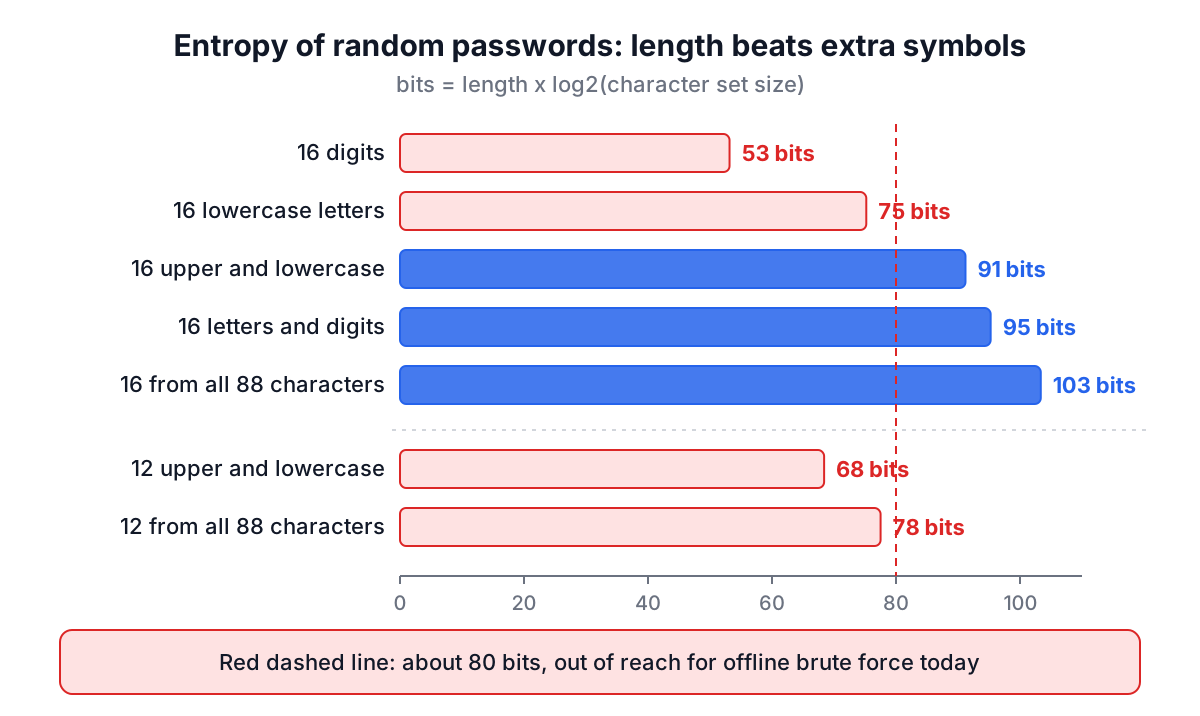
So a random 16-character password from all 88 characters has about 16 x 6.46 = 103 bits of entropy. Each extra bit doubles the number of guesses needed.
Compare two ways of strengthening a 12-character letters-only password (68 bits):
- Add symbols and digits: 12 x 6.46 = 78 bits.
- Add four more letters instead: 16 x 5.7 = 91 bits.
Length wins. That is the core insight behind the modern guidance.
An important caveat: this math only applies to random passwords. Password123! uses all four character types but has very little real entropy, because it is one of the first things any cracking tool tries. Entropy calculators that just count character types badly overestimate human-chosen passwords.
How much is enough?
It depends on how the password is stored and attacked.
- Online attacks, guessing through a login form, are slowed by rate limiting and lockouts. Even modest passwords resist them.
- Offline attacks happen after a database breach. The attacker has the hashes and can guess as fast as their hardware allows. If the site used a fast hash, billions of guesses per second are realistic; if it used bcrypt or Argon2, far fewer.
You cannot know how a site stores your password, so plan for the worst case. Around 80 bits of true randomness is out of reach for brute force with current hardware. A random 14 to 16 character password gets you there, which is why 16 is a comfortable default.
Randomness matters
The word "random" hides an important detail. JavaScript's Math.random() is a fast pseudo-random generator designed for things like games and animations. It is not designed to be unpredictable to an adversary. For passwords, keys and tokens, browsers provide crypto.getRandomValues(), which draws from the operating system's cryptographically secure random source.
The RedBison generator uses crypto.getRandomValues(). It also uses rejection sampling: a naive randomByte % 88 would make some characters slightly more likely than others (modulo bias), so values that would cause bias are discarded and redrawn. Every character in the set is equally likely.
Passphrases
A passphrase made of several random words, popularized by the Diceware method and the well-known xkcd "correct horse battery staple" comic, is a good choice for the few passwords you must type or remember, such as your computer login or password manager master password. Each word chosen at random from the 7,776-word Diceware list adds about 12.9 bits, so six words give about 77 bits.
The key word is again random. A memorable phrase you made up, or a song lyric, is far weaker than words picked by dice or software.
Practical advice
- Use a password manager. It is the only realistic way to have a different long random password for every site.
- Generate a unique password for every account. Credential stuffing, replaying passwords leaked from one site on others, is one of the most common attacks.
- Aim for 16 or more characters wherever the site allows.
- Turn on multi-factor authentication, preferably passkeys or an authenticator app rather than SMS.
- Change a password when there is a reason: a breach notification, a shared device, suspicious activity.
- Check breach exposure with a service like Have I Been Pwned.
For developers
If you build login systems, the advice flips round:
- Accept long passwords (at least 64 characters) and all printable characters, including spaces.
- Do not impose composition rules or silent truncation.
- Check new passwords against a breached-password list.
- Store passwords with a slow, salted hash such as Argon2id or bcrypt. See the bcrypt guide.
- Rate-limit login attempts and support MFA and passkeys.
Using the generator
Drag the slider to the length you want, tick Numbers and Symbols if the site accepts them, and click Generate Password. If a site rejects some symbols, untick Symbols and add a few characters of length to compensate. The password is created in your browser and never sent or stored. The share button copies a link with your settings only, never the password.
Related tools
- Bcrypt Hash Generator to see how passwords should be stored
- Hash Generator to understand why fast hashes are wrong for passwords
- UUID Generator for unique identifiers that are not secrets
Frequently asked questions
What are the NIST password guidelines?
NIST SP 800-63B, revised in 2017, says to favour length, requiring at least 8 characters for user-chosen passwords and allowing at least 64. It drops composition rules, stops forced rotation unless there is evidence of compromise, screens new passwords against breached and common ones, and allows paste so password managers work.
Is a passphrase better than a random password?
A random passphrase is a good choice for the few passwords you must type or remember, such as a computer login or password manager master password. Each word picked at random from the 7,776-word Diceware list adds about 12.9 bits, so six words give about 77 bits. For every other account, a long random password stored in a password manager works best.
How many bits of entropy does a password need?
Around 80 bits of true randomness puts a password out of reach of brute force with current hardware, even in an offline attack on fast hashes. A random 14 to 16 character password reaches that level. A random 16-character password drawn from 88 letters, digits and symbols has about 103 bits, since each character adds about 6.46 bits.
Why should password generators not use Math.random()?
JavaScript's Math.random() is a fast pseudo-random generator built for games and animations, not for being unpredictable to an adversary. Passwords should come from crypto.getRandomValues(), which draws from the operating system's cryptographically secure source. The RedBison Password Generator uses it with rejection sampling, so modulo bias is avoided and every character is equally likely.
Sources and further reading
- NIST SP 800-63B: Digital Identity Guidelines, Authentication and Lifecycle Management, NIST. The 2017 revision.
- NIST SP 800-63B-4: Authentication and Authenticator Management, NIST. The current revision.
- Crypto: getRandomValues() method, MDN Web Docs.
- Pwned Passwords, Have I Been Pwned. Checking a password against known breaches.
More Security Tools
Every tool in the Security Tools section, free and in your browser.
- Hash Generator
- Password Generator
- Bcrypt Hash Generator
- Htpasswd Generator
- JWT Decoder
- SSL Checker
- Security Headers Analyzer
- JWK Tool
- X.509 Parser
- SQL Injection Tester
- SAML Tool
- Hash File Verifier
- Digital Signature Validator
- Security Threat Checklist
- Password Strength Checker
- TOTP / 2FA Code Generator
- HMAC Generator
- AES Encrypt & Decrypt
- RSA & EC Key Pair Generator