
100 Developer Tools in Your Editor: RedBison for VS Code and JetBrains
Format JSON, decode a JWT, hash a string or explain a cron expression on the current selection, without the tab switch. Sixty-five of them work with no connection at all.
By Redbison Dev · · Updated · 6 min read

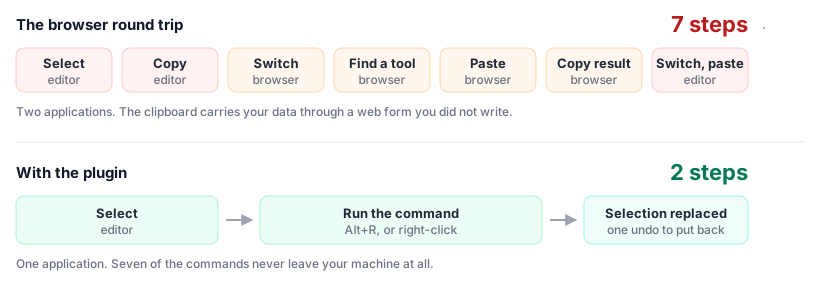
Most developer tools are a tab away. You copy a response body, switch to the browser, find the formatter you used last time, paste, copy the result, switch back, paste again. It takes fifteen seconds and breaks whatever you were holding in your head.
The RedBison plugins remove the round trip. Select the text, run the command, and the result replaces the selection. Thirty-five tools, in VS Code and in every JetBrains IDE, free and open source.
What's in them
Format and convert. JSON (format, minify, validate), YAML and JSON in both directions, CSV and JSON in both directions, SQL, HTML, XML, JavaScript, CSS, and Markdown tables.
Encode and hash. Base64, URL percent-encoding, MD5 through SHA-512, HMAC with the GitHub, Stripe and Slack webhook presets, and JWT decoding.
Look things up. HTTP status codes, MIME types, cron expressions in plain words with the next few run times, epoch timestamps, number bases, and regular expressions tested against your selection.
Text. Change case, slugify, remove duplicate lines, join lines, count words.
Insert. A UUID, a strong password, placeholder text, a .gitignore for
the stacks you name.
Why an editor plugin and not just the website
The website is not going anywhere, and for a lot of these tools it is the better place to work. A regular expression you are building up over several minutes wants the live match highlighting. A colour you are choosing wants to be seen against a background. A cron expression you are not sure about wants the next ten run times laid out.
What the website is bad at is the fifteen-second job. Reformatting a response body you just pasted into a scratch file. Decoding the payload of a token from a failing request. Checking whether that hash in the config matches the file you have. Those are not browsing tasks, and making them browsing tasks is what breaks your concentration.
So the split is deliberate. The plugin covers the operations that are mechanical, where you already know what you want and simply need it done to the text in front of you. Every command in it also links to its full page, for the moment a quick job turns into a longer one.
How it behaves in the editor
This is the part that decides whether a plugin stays installed.
A transform replaces your selection and takes exactly one undo to put back. Not three, and not a half-applied edit. One. If the input is wrong, the command says so and leaves your buffer alone rather than writing a partial answer over your code.
An inspection opens the result beside your file and never edits it. Decoding a JWT or hashing a string shouldn't touch the document you're in.
An insert drops text at the cursor.
In VS Code, select, then <kbd>Ctrl/Cmd</kbd>+<kbd>Shift</kbd>+<kbd>P</kbd> and type RedBison, or right-click and use the RedBison submenu. In JetBrains, press <kbd>Alt</kbd>+<kbd>R</kbd>, then type a few letters of what you want.
Sixty-five of them don't need a network
The JSON commands, Base64 and URL encoding both ways, hashes and HMACs, JWT
decoding, case conversion, sorting including a natural sort that puts file9
before file10, hex, UUIDs, passwords, subnets, chmod, IEEE 754, line and
word counting, and extracting URLs, addresses and numbers all run inside the
editor. No request, no wait, nothing leaving your machine, which also means
they work on a plane.
Twenty-three of those have no server equivalent at all, and they are implemented twice, once in TypeScript and once in Kotlin, so a command cannot behave one way in VS Code and another in IntelliJ. A single table of behaviour cases is run by both suites to keep them honest.
The remaining thirty-five call the same endpoint the website runs on, and they are the ones that need a real parser or a data set that changes without us: YAML, SQL, HTML, XML, JavaScript and CSS formatting, bcrypt, ASCII-art fonts, schema validation, user-agent tables. Shipping six language parsers into an editor plugin to format YAML twice a year is a worse trade than one request.
What it costs to have installed
An editor plugin earns its uninstall by being in the way. So, concretely:
- Nothing runs in the background. No file watchers, no document listeners, no polling, no work at startup beyond registering the commands.
- No telemetry and no account. Nothing is counted, nothing is stored.
- A command sends only the text you selected, and only when you run it.
- Large selections are declined, not uploaded. Past a megabyte the command tells you to use the web page instead of quietly posting your file over a tethered connection.
- Every request has a timeout, so a flaky connection can't leave a progress bar spinning forever.
The VS Code extension is 61KB and the JetBrains plugin 88KB, most of it the local implementations that keep sixty-five commands off the network. Neither pulls in a third-party library, and the JetBrains plugin talks to the endpoint with the HTTP client that ships in the JDK your IDE already runs.
One honest gap
Minify JSON is VS Code only. The server-side formatter has no minify option, so rather than ship a JetBrains command that quietly returns formatted JSON when you asked for minified, we left it out and the tool page links to the web version. A command that lies is worse than a command that isn't there.
Install
VS Code. Extensions, search RedBison Tools, install. Or
code --install-extension redbison.redbison-tools.
JetBrains. Settings → Plugins → Marketplace, search RedBison Tools, install, restart. Needs 2023.3 or newer.
Both are MIT licensed and built in the open. The full list of commands, with a worked example for each, is on the plugins page.
Frequently asked questions
Does the plugin send my code anywhere?
Only the text you select, only for the command you run, and only for the thirty-five commands that need the server. The other sixty-five happen inside the editor and send nothing at all. Nothing is sent in the background, nothing is stored on our side, and there is no telemetry and no account.
Which commands work without an internet connection?
Sixty-five of the hundred: the JSON commands, Base64 and URL encoding, UUIDs and passwords, hashing, HMAC, JWT decoding, the text and line commands, number bases, timestamps, regular expressions, HTTP status and MIME lookups, CSV conversion, Markdown tables, subnets, chmod, IEEE 754 and more. The command palette marks the rest with a cloud icon. Twenty-three of the local ones are implemented natively in both plugins, so they work offline in IntelliJ too.
Will it slow my editor down?
It does no work unless you run a command. There are no file watchers, no document listeners, no background polling and no startup tasks beyond registering the commands, and the VS Code extension is nineteen kilobytes. The documentation is kept in a separate file that is read only if you open it, rather than loaded into memory for everybody.
Why is Minify JSON missing from the JetBrains plugin?
The server side formatter has no minify option, so a JetBrains command would have had to return formatted JSON while claiming to minify. Leaving it out and pointing at the web page is the honest version. VS Code can offer it because it does that one locally, where the behaviour is defined by the JSON specification rather than by us.
What happens if I select a very large file?
Past about a megabyte the command declines and suggests the web page instead of quietly uploading your file. The limit is lower for commands that use the network than for the ones that run locally, because the cost there is your bandwidth and your waiting rather than a few milliseconds of parsing.
Sources and further reading
- Extension API, Visual Studio Code. The activation events, command contributions and editor edit API the extension is built on.
- Extension Manifest, Visual Studio Code. Why commands have to be declared statically before they appear in the palette.
- IntelliJ Platform Plugin SDK, JetBrains. Actions, the action system and the threading rules the plugin follows.
- Publishing a Plugin, JetBrains. The vendor profile, signing and the compatibility range.
- Model Context Protocol, Anthropic. The protocol the plugins use to reach the same tools the website runs.
- RFC 4648: The Base16, Base32, and Base64 Data Encodings, Internet Engineering Task Force. The standard the offline Base64 commands implement.