
100 Developer Tools in Your Terminal: the RedBison CLI
Format JSON, decode a JWT, hash a release or compare two lists from the command line, piping as you go. One npm install, no account, and 65 of them never touch the network.
By Redbison Dev · · Updated · 7 min read

There is a particular kind of small task that interrupts whatever you were doing. A JSON response from curl arrives on one line and you need to read it. A colleague pastes a JWT and asks what is inside. You want the SHA-256 of a release file. You have two lists of URLs and need to know which ones disappeared.
None of these is hard. All of them are a detour: open a browser, find a site, paste, copy back. The paste is the part worth thinking about, because that response may hold a session token and that JWT certainly holds something.
The RedBison CLI puts a hundred of those tools in your terminal instead, where your shell already is.
npm install -g @redbison/cli
$ curl -s https://api.example.com/thing | redbison json-format
{
  "id": 42,
  "name": "RedBison"
}
Sixty-five of the hundred never touch the network.
It reads input the way everything else does
A tool takes its input from an argument, a file, or a pipe, whichever you give it. There is nothing to learn beyond that.
redbison rot13 "hello"                 # an argument
redbison json-format --file data.json  # a file
cat data.json | redbison json-format   # a pipe
redbison json-format @data.json        # @path is shorthand for --file
The answer goes to standard output and nothing else does. That single decision is what makes the tool composable rather than merely available:
redbison hash --algorithm sha512 --file release.tar.gz | pbcopy
redbison json-validate --file config.json || echo "config.json is not valid JSON"
for f in *.json; do redbison json-format --file "$f" > "$f.tmp" && mv "$f.tmp" "$f"; done
Diagnostics, hints, and the fact that a tool ran on the server all go to standard error, where a pipe will not pick them up. If you redirect the output of redbison hash into a file, you get a digest and not a sentence about a digest.
Every option is a flag, and a wrong one is refused
Fifty of the tools take options, 106 flags in all,. They are ordinary flags, and each one's values and default are in the help page:
$ redbison hash --help
redbison hash: Hash the selection

MD5, SHA-1, SHA-256 and SHA-512 of the selection.

Usage:
  redbison hash [options] [text]
  cat file | redbison hash [options]
  redbison hash [options] --file path

Options:
  --algorithm <value>  digest algorithm; one of: sha256, sha512, sha384, sha1, md5; default "sha256"
                         sha256        the usual choice
                         sha1          broken for signatures, fine for checksums
                         md5           broken for signatures, fine for checksums
  --encoding <value>   how to print the digest; one of: hex, base64; default "hex"
The help page is generated from the same specification the parser uses, so it cannot advertise an option the tool would reject or omit one it accepts.
That specification is also why a typo is an error rather than a shrug:
$ redbison hash --algoritm sha512 abc
Unknown option --algoritm. hash takes --algorithm, --encoding. Did you mean --algorithm?
A CLI that ignores flags it does not recognise would have hashed with SHA-256 and printed something that looks exactly as correct as the right answer. Digests have no tell. Neither do encodings, case conversions, or sort orders. Refusing is the only safe behaviour, so the parser refuses.
Sixty-five of them never leave your machine
This is the part that matters for the inputs people actually paste into tools.
Sixty-five commands run entirely in the process: JSON formatting, minifying and validating, base64 both ways, URL encoding, hashes and HMACs, JWT decoding, case conversion, sorting including a natural sort that puts file9 before file10, hex, UUIDs in five variants, passwords, subnets, chmod, IEEE 754, IP conversion, line and word counting, extracting URLs and addresses and numbers. They are arithmetic and string work. There is no reason for them to involve anyone else, so they do not.
Thirty-five do ask the server, and they are the ones that need a real parser or a data set that changes without us: YAML, SQL, HTML, XML, JavaScript and CSS formatting, bcrypt, ASCII-art fonts, JSON Schema validation, user-agent tables. Those send the input to mcp.redbison.dev and send nothing else. No account, no identifier, nothing stored.
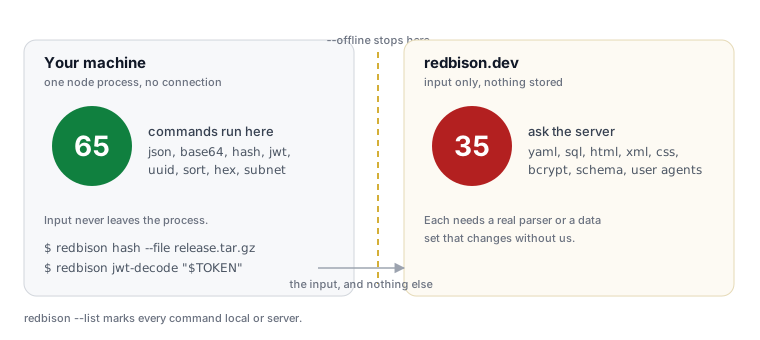
If you would rather be certain than take that on trust, there is a flag:
$ redbison yaml-to-json --offline "a: 1"
yaml-to-json runs on the server, and --offline was given, so nothing was sent.
Tools that work without a network: redbison --list | grep local
--offline refuses rather than sending. It is the kind of promise a tool should let you check rather than ask you to believe, and redbison --list | grep local | wc -l prints 65.
Run it with nothing after it
redbison on its own opens a full-screen picker over the hundred tools.
 Catalogue: redbison.dev           <0> all tools                   ███  ████ ███  ███  ███   ███ ███  █  █
 Tools:     100 (65 local)         <1> Data and JSON               █  █ █    █  █ █  █  █   █    █  █ ██ █
 Showing:   all tools [2]          <2> Text                        ███  ███  █  █ ███   █   ███  █  █ █ ██
 Filter:    /b64                   <3> Encoding and hashing        █ █  █    █  █ █  █  █      █ █  █ █  █     █
 Offline:   off                    <4> Formatters                  █  █ █    █  █ █  █  █      █ █  █ █  █   █▀█ █▀█ █ █
 Version:   0.2.0                  <f> all categories              █  █ ████ ███  ███  ███  ███  ███  █  █ ▄ █▄█ ▀█▄ ▀▄▀

┌─ Tools(all)[2] /b64 ─────────────────────────────────────────────────────────────────────────────────────────────────┐
│ NAME                   CATEGORY              WHERE  WHAT IT DOES                                                     │
│ base64-decode          Encoding and hashing  local  Decode the selected Base64.                                      │
│ base64-encode          Encoding and hashing  local  Encode the selection as Base64.                                  │
└──────────────────────────────────────────────────────────────────────────────────────────────────────────────────────┘
<tools>
/ searches as you type, by keyword as well as by name: unix timestamp finds epoch, pretty print finds the formatters, and initials still work, so b64 finds base64-encode. 0–9 jump between categories and f lists them. d opens a tool's documentation: what it does, where it runs, every option with its default, and the same worked example the help page carries. enter runs it with that example already loaded, e edits the input first, p edits the options, x turns on offline so a server-backed tool refuses rather than sends.
y copies what is on screen. With an answer up it is the answer, an error message included, since that is the text you want in a search box or a bug report. Without one it is the command that would produce it, options and all: redbison json-format --indent 6, quoted so it survives a paste into a shell. It is the same line the documentation pane shows, so the clipboard and the screen cannot disagree.
Options typed in the picker go through the same validator as the command line, so both refuse the same values. A picker that accepted --variant xyz would be a second, quieter way to get a wrong answer.
It starts only when both ends are a terminal and CI is unset, so pipes, scripts and builds behave exactly as they did; --no-ui turns it off permanently. REDBISON_THEME=terminal drops the palette to the sixteen ANSI colours, which your terminal already maps to the scheme you chose, so it comes out in Dracula, Gruvbox, Nord or Solarized with nothing to configure. A light background gets that automatically.
The picker's shape is inspired by k9s and the other open-source terminal applications that showed what command line UX can be for developers: the information block, the key hints, the counted title, the breadcrumb trail, the filter and command bars. Its default palette follows k9s's own default skin. Credit to everyone who built them.
The same hundred tools as everywhere else
The CLI, the VS Code and JetBrains plugins, the website and the MCP server for AI assistants are generated from one catalogue. A tool added to that list appears in all of them, with the same name, the same options and the same behaviour.
That is not only tidiness. The sixty-five local implementations are exercised by a single table of behaviour cases, and the CLI, the VS Code suite and the IntelliJ suite all run it. When the editors last disagreed about whether a bare word counts as a query string, the table caught it on the first run. Three front ends holding one description of what a tool does is what keeps redbison base64-decode and the editor command from drifting apart over a year of small changes.
Finding what you need
The names only help if you know them, which is the problem every catalogue of a hundred things
has. search matches the same keywords the search box on the website matches, so you can
describe the job instead:
$ redbison search unix timestamp
epoch                   local   Convert timestamp

$ redbison search pretty print json
json-format             local   Format JSON

$ redbison search uuid v7
uuid                    local   Insert UUID
Matches go to standard output in the same shape as --list and the hints go to standard error,
so redbison search hash | cut -d' ' -f1 is a usable list of names. --json gives a script the
whole record of each match, and the exit code says what happened: 0 found something, 1
nothing matched, 2 no query. Inside the picker, / runs the same search.
redbison --help            # all 100, grouped
redbison --list            # one per line, for grep
redbison --list | grep -i base64
redbison base64-decode --help
Every tool's help page carries a worked example, and those examples are captured from the real implementation rather than written by hand, so the output shown is the output you get.
Exit codes are conventional: 0 worked, 1 the tool refused the input or the server could not be reached, 2 the command line was wrong. That makes the tools usable in a script without parsing their prose.
What it costs
The published package is a single bundled file. There is no dependency tree to audit, no postinstall step, and nothing runs until you type a command. Node 18 or newer is the only requirement. rb is installed as a shorter alias for the same binary.
It is MIT licensed, and the source for every tool is in the repository, including the hundred-entry catalogue the CLI and both editor plugins are generated from.
One honest limitation
The thirty-five server-backed tools need a connection, and in an air-gapped environment you have sixty-five commands rather than a hundred. We would rather say that plainly than ship a parser for six languages into a CLI and make every user download it to format YAML twice a year.
The split is visible at all times: redbison --list marks each tool local or server, every help page says which it is, and --offline makes the boundary enforceable rather than advisory.
Install
npm install -g @redbison/cli
redbison --version
Or run it once without installing anything:
npx @redbison/cli json-format package.json
Frequently asked questions
Does the CLI send my input anywhere?
For 65 of the 100 tools, no. They run in the Node process on your machine and the input never leaves it. The other 35 send the input to mcp.redbison.dev to be processed, and send nothing else: no account, no identifier, and nothing is stored. Pass --offline to refuse rather than send, and redbison --list marks every tool local or server so you can see which is which before you run one.
Which tools work without an internet connection?
Sixty-five of them, including all the JSON tools, base64, URL encoding, hashes and HMACs, JWT decoding, case conversion, sorting, hex, UUIDs, passwords, subnets, chmod and IEEE 754. Run redbison --list | grep local for the current list. The ones that need a connection are those that need a real parser or a data set that changes without us, such as YAML, SQL and the language formatters.
How is this different from jq?
It is not a replacement for jq, which queries and transforms JSON with a language of its own. This is a hundred small tools that each do one thing with no language to learn, covering formats jq does not touch at all: JWTs, hashes, base64, YAML, TOML, cron expressions, subnets, colours. The two compose happily, since both read standard input and write standard output.
Does it need an account or an API key?
No. There is nothing to sign up for, no key to paste and no configuration file to write. The 65 local tools need nothing at all, and the 35 server-backed ones are called anonymously, so the CLI works the moment the install finishes.
Can I use it in a CI pipeline?
Yes, and the exit codes are designed for it: 0 worked, 1 the tool refused the input, 2 the command line was wrong. redbison json-validate --file config.json is a usable gate on its own. For a pipeline with no outbound network access, stay on the 65 local tools and pass --offline so a mistake fails loudly instead of hanging on a connection.
Sources and further reading
- npm: installing packages globally, what
npm install -gdoes. - Node.js: Release schedule, for which Node versions are still supported.
- POSIX utility conventions, the argument and stream conventions this follows.
- RFC 7519: JSON Web Token, the structure
jwt-decodereads. - RFC 4648: Base16, Base32 and Base64 encodings, including the URL-safe alphabet
--variant urlproduces. - Model Context Protocol, the protocol the server-backed tools use.