
What to Check Before Launching an App You Vibe-Coded
The app works. That is not the same as safe to launch. A first pass over the eight things AI builders leave at their defaults, from row-level security to who gets woken up when it breaks.
By Redbison Dev · · 11 min read
The app works. Someone described what they wanted, an AI builder produced it, and the signup, the dashboard and the checkout all do what they look like they do. That is a real achievement and it is also the part that was never in doubt. The question nobody prompted for is whether it is safe to put in front of people, and the answer usually comes down to eight things that were left at whatever the default was.
I have ended up doing the same first pass on every app built this way. It is not a security audit and it does not need one. It is a short list of places where AI builders are reliably quiet, in rough order of how much damage they do when they are wrong.
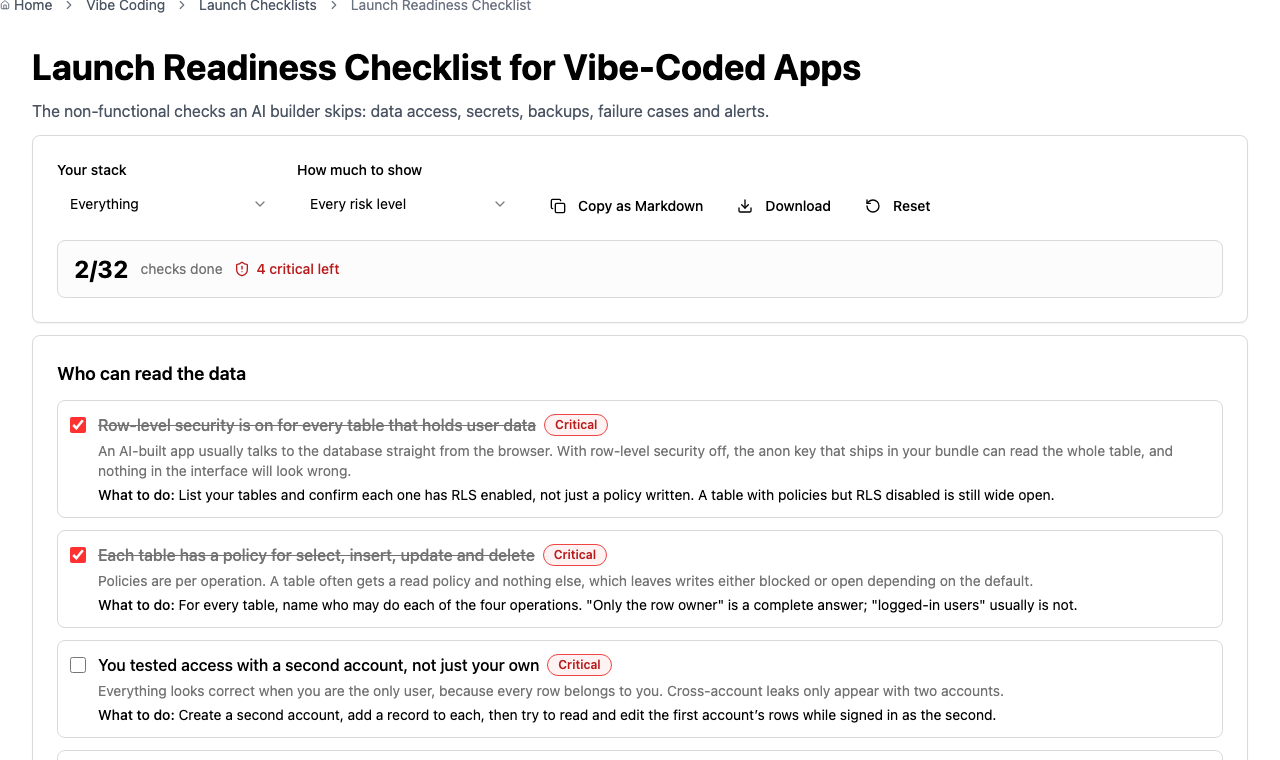
The Launch Readiness Checklist is this list as something you can tick through and export. What follows is the reasoning behind it.
Who can read the data
Open this first, because it is the one that actually hurts people.
An app built this way almost always talks to its database straight from the browser, using a key that ships inside the JavaScript bundle. That is a deliberate design, not a mistake: the key is meant to be public, and the thing standing between one user and everybody else's records is row-level security on the database itself.
So the question is not "is there a login". It is whether every table holding user data has row-level security switched on, and a policy covering each of select, insert, update and delete. Policies are per operation. A table very often gets a read policy and nothing else, which leaves writes at the default, and the default is not always the one you want.
Two traps worth knowing. First, row-level security being enabled and a policy existing are separate settings; a table with carefully written policies and RLS switched off is wide open, and the interface looks completely normal. Second, you cannot find a cross-account leak while testing as yourself, because every row belongs to you. Make a second account, put a record in each, and try to read the first account's rows as the second. That five-minute test finds more than any amount of reading.
File storage is configured separately from the database and is easy to miss. A private record can link to a public file URL. Open an uploaded file's address in a signed-out private window; if it loads, the bucket is public.
Where the keys live
Everything the browser downloads is readable by anyone who opens developer tools. A payment, email or model-provider key pasted into a component is therefore public from the moment you deploy, and the bill is yours.
The useful distinction is between keys designed to be published and keys that are not. A Supabase anon key or a Stripe publishable key belongs in the browser. Anything that can spend money, send email on your behalf or read every row does not; it belongs in a server function with the value stored as a secret there.
If a secret key has ever been in the frontend or in a public repository, deleting the line does not fix it. The key is in your git history, and it is inside every bundle anyone has already downloaded. Rotate it at the provider so the old value stops working. Rotation is the fix; deletion is tidying.
While you are there, write down every environment variable your app needs, by name and purpose, somewhere outside the platform. Rebuilds fail on the one variable nobody remembered, and they tend to happen during incidents.
Backups that actually restore
"It's in the cloud" describes where the only copy lives. That is the problem rather than the reassurance.
Two questions settle this. Can you export the whole database today, and have you ever restored one of those exports? An export nobody has restored is a file you hope is a backup; truncated dumps, missing roles and broken sequences are discovered during the restore, never before it. Restore into a scratch project and point the app at it. If it runs, you have a backup.
Then make it happen without you remembering. Manual backups stop in the week you get busy, which is the week you need one.
One habit worth forming immediately: take an export before letting an agent change the schema. A prompt that drops or rewrites a column reads exactly like a prompt that adds one, and the agent cannot undo it for you.
What happens when things go wrong
Generated code builds the happy path beautifully and tends to assume the request succeeds. The failure modes are where it gets thin, and they are easy to test deliberately.
Turn off wifi and submit the most important form. A spinner that never resolves is a failure; an error the user can act on is a pass. Press submit twice quickly and see whether you get two orders. Drop a very large file into an upload field meant for an avatar. Leave a tab open past the session lifetime, come back and click something. Each of these takes under a minute and each one is a real complaint you are choosing not to receive later.
Give every outbound call to a third party a timeout, and decide what the page shows when it fires. A model provider having a bad minute should degrade one feature, not hang the whole page.
Knowing that it broke
Production builds drop console output, so without error reporting the only channel is a customer who cares enough to complain. Most do not; they leave.
Add any error-tracking service, then throw an error on purpose in production to prove the event actually arrives. Point a free uptime monitor at your home page and at one page that needs the database, so an expired certificate or a failed deploy does not quietly cost you a day. Send the alerts somewhere you are already interrupted, and name who is expected to respond. An alert in an unread inbox is worse than no alert, because it feels like coverage.
Set a spend cap or a billing alert on anything priced by usage. Model APIs, email and bandwidth all bill by use, and a loop or a scraper can turn a quiet week into an expensive one.
Getting your code out
If the only copy of your app lives inside one platform account, then their outage, price change or suspension is your outage. That may be a perfectly acceptable risk, but it should be one you have decided rather than inherited.
Three checks. The code is in a repository you own. The project builds and runs outside the builder that made it, which you know because you have cloned it and done so. The domain is registered in your own account with DNS you control, not inside the platform where it will be awkward to retrieve at exactly the moment you want it.
The ordinary things, before real users arrive
Check the live response carries basic security headers with the Security Headers Analyzer; generated apps rarely set them and they are the cheapest defence available. Run your main flow on an actual phone rather than a narrow browser window. Tab through the app without touching the mouse, because generated markup leans on clickable divs that keyboard users cannot operate at all. Look at what the first page downloads, since AI builders import generously and a multi-megabyte first load silently costs you everyone on a slow connection.
For a broader view of the attack classes behind these, the Security Threat Checklist covers 22 of them with prevention notes.
Legal, briefly
Your privacy policy should describe what your app actually does. A generated one typically names services you do not use and omits the ones you do, which is worse than having nothing, because it is a specific written claim that happens to be false. List every third party that receives visitor data and make the policy match.
Work out how you would delete one person's data when they ask, and run it once on a test account. Those requests arrive by email with deadlines attached, and improvising under time pressure is how related rows get missed. If user input goes to a model provider, say so, and say whether it is used for training.
Frequently asked questions
How long does this first pass take?
Expect two to three hours for an app you built yourself, and most of that is the data-access section. The critical items alone are closer to an hour. Fixing what you find takes longer, but knowing which problems you have is the part that determines whether you launch this week or next.
Which single check matters most?
Row-level security on every table holding user data. Apps built this way query the database directly from the browser, so the database rules are the only barrier between one user and everyone else's records. It is also the failure that looks completely normal from inside the app.
Is a Supabase anon key in the browser a security problem?
No, it is designed to be public, and it ships in the bundle by intention. What makes it dangerous is a table without row-level security, because then that public key can read everything. The key is fine; the table configuration is what you are checking.
Do I need a security audit before launching?
Not usually for a first launch with few users. A deliberate pass over data access, secret keys, backups and failure cases removes most of the realistic harm. A formal audit becomes worthwhile once you hold payment data, health data or other people's customer records.
Can I just ask the AI builder to fix these?
For some items, yes, and writing policies is one it handles reasonably. The trap is that you cannot verify a fix by asking the same tool whether it worked. Check the result yourself, especially with a second account, because an agent reporting success is not evidence.
Sources and further reading
- Row Level Security, Supabase. Enabling RLS per table and writing a policy for each operation.
- Using Row Level Security, PostgreSQL. The database behaviour the hosted guides are built on, including what happens with no policy.
- Secrets Management Cheat Sheet, OWASP. Why rotation is the only remedy for an exposed key.
- OWASP Top Ten, OWASP. Broken access control is the most common serious weakness in web applications.
- Web Content Accessibility Guidelines (WCAG) 2.2, W3C. The keyboard and contrast expectations behind the accessibility checks.